
Q :Why are the points/edges/etc I select on my model colored orange/red/yellow, and why does moving them affect more of my model than I want them to?

A: You turned on Soft Selection [most likely by hitting the "b" key] Hitting the "b" key again will turn it off, or you can take the long route and open the tool settings and toggle it there.
Also please note, this mode can be activated and used in the UV Texture Editor as well.
///////////////////////////////////////////////////////////////////////////////////////
Q: I'm trying to follow a tutorial and it says I need to go to the "Modeling" menu set, its not there, why?
 |
| Menu set selection |
A: In later versions the menu set "Modeling" was split up into "Polygons" and "Surfaces". If this doesn't sit well with you then you can choose "customize" and create your own set.
///////////////////////////////////////////////////////////////////////////////////////

A: If you pressed Ctrl + Space then you've hidden most of the UI, pressing it again will bring it back. Also you can bring back individual portions of the interface by going to Display>UI Elements and checking on whatever you need or just show/restore them all and that option is found under the same Display menu. If you've hidden the main menus then you can access this display menu from the hotbox, simply hold down the space bar.
///////////////////////////////////////////////////////////////////////////////////////
 |
| jagged edges and noise |
///////////////////////////////////////////////////////////////////////////////////////
A: It's probably not loaded, go to Window>Settings/Preferences> Plug-in Manager and look for "Mayatomr.mll".
 |
| Loading Mental Ray |
Q: I can't see my move/rotate/scale manipulators, why?
 |
| Missing manipulators |
A: Hit the + or - key to resize the them. Also, if the rotate tool just won't show, it could be a display problem, you might need to update or roll back your graphic drivers. In all fairness, I've closed and reopened Maya and had the problem go away [yeah what the hell right?]
///////////////////////////////////////////////////////////////////////////////////////
Q: How can I cleanly delete edges and vertices?
A:You can select the edges and hit the delete key but that will leave vertices behind and you might unknowingly create messy goemetry, on the other hand, if you wanted to redraw the edges while keeping the basic shape this method could come in handy.
The clean way to do it is to select the edges/vertices and use the "Delete Edge/Vertex" polygon procedure

 |
| Deleting edges/vertices with the "delete" key |
 |
| Deleting edges/vertices with the polygon function |
///////////////////////////////////////////////////////////////////////////////////////
Q: Why I can't I see my texture on my model?
 |
| Troubleshooting texture display |
A: Hit "6" on the keyboard, this goes into hardware texturing mode [sometimes it's the simple stuff that get you!]. If that doesn't help, open the Attribute Editor on the material and scroll down to the "Hardware Texturing" section and make sure the "Textured channel" is NOT set to "none", preferably the "color" channel. If that doesn't work, then check the "Shading" menu in your panel[s] and make sure "use default material" is NOT checked.
Also, in some cases when the texture won't show even if you render it, it could be that your model has no UVs, you can use a quick automatic mapping to test it.
///////////////////////////////////////////////////////////////////////////////////////
Q: Why is my texture acting weird in the viewport when I move my model in 3D space? It's behaving jittery!
///////////////////////////////////////////////////////////////////////////////////////

A: This happens when the camera "clips" objects off that are x units away for the sake of performance, select the camera, open the Attribute Editor and increase the far "clip plane". In the same vein, the near clip plane will cut objects off when they get within x units of the camera which can be a little annoying if you need to zoom in very close to edit some tricky vertices. Camera clipping does not affect how the object[s] software render.
Q: Why is my animated object moving through my texture in my rendered animation?
A:
Chances are, you plugged a 3D texture or a projection into the shader and its staying stationary while your model is moving, so the texture placement node needs to be parented to the object.
///////////////////////////////////////////////////////////////////////////////////////

A: Your UV's aren't laid out properly, look into UV Mapping. Going into detail on this subject isn't FAQ material so tough break.
///////////////////////////////////////////////////////////////////////////////////////
Q: I just created a new cube and I'm trying to change the number of divisions in the channel box but there are no inputs why?
 |
| Missing inputs |
A: You need to turn on construction history in order for Maya to keep track of such things. It's the little icon in the upper right side portion of the screen with the white page on it. If you're using a version previous to 2009, then the icon looks more like a scroll than a flat sheet of paper.
///////////////////////////////////////////////////////////////////////////////////////
Q: Why does my image within the Maya render view have jagged edges no matter what renderer and render settings I use?

///////////////////////////////////////////////////////////////////////////////////////
 |
| Overlapping faces |
A: More than likely, you have a duplicate of your model in the same exact position as the original or your model has lamina faces (faces that sit in the exact same space, sometimes due to the user forgetting that they extruded some faces that they didn't bother moving around or undoing). Identical geometry sitting on top of each other can result in garbled shading in the rendered image.
///////////////////////////////////////////////////////////////////////////////////////

A: The sampling is too low. Increase the shadows rays on the light[s], same goes for its "Area Light" high samples of the Mental Ray section if you checked it on, when this is on, the shadow rays attribute doesn't have an effect. These attributes in addition to the anti-aliasing in the render settings can eliminate grain at the cost of render speed so being careless with sampling can make you want to drop kick your machine.
///////////////////////////////////////////////////////////////////////////////////////

A: Could be one or a combination of reasons.
- raytracing isn't turned on in the render settings
- even if its turned on, the refraction traces may be too low to pass through the surfaces [also, max trace settings must be high enough to cover both reflection and refraction traces].
- if Final Gathering is enabled the tracing should be checked as well, its very much like the raytrace settings.
-last but not least, the material's refraction tracing. Refraction Limit on standard Maya shaders and Max Trace Depth on mia_materials.

///////////////////////////////////////////////////////////////////////////////////////

A: Chrome is a highly reflective surface, but in the 3D world, a highly reflective shader looks kind of crappy without an environment to reflect, which is something that is taken for granted in the real world where we are automatically surrounded by tiles, ceilings, desks, windows, trees, sky, buildings etc. Making chrome is as easy as making a dark colored shader and giving it high reflectivity. Why make the shader dark? Because if you don't, the reflection will be added onto the color and the shader will look brighter and not as reflective as it should, its especially obvious on the standard Maya shaders [of course some degree of reflection blurring will make it look better -Mental Ray can do this but Maya Software renderer can't].

///////////////////////////////////////////////////////////////////////////////////////
A: It's a lighting setup that uses one light as a key light or your main source of light. Another for a "fill" light, you know, the light that illuminates the spots where the key light doesn't hit, to eliminate pitch black areas and simulate ambient or indirect illumination. And a "rim" light that is placed more in the back of the subject to create an outline that accents the subject's contours. Some artists approach creating the rim light effect using materials instead of lights!
///////////////////////////////////////////////////////////////////////////////////////
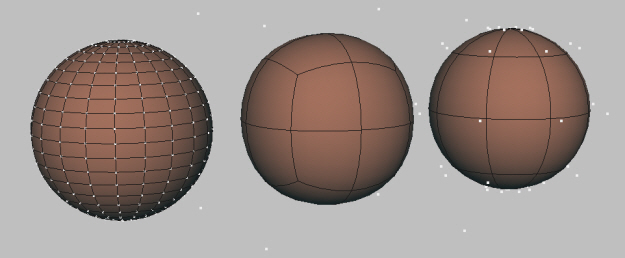 |
| Poly SubD and NURBS spheres from left to right |
A:
Polygons are surfaces made up of faces, each face is an enclosure of edges, whether it be three edges, four edges, or more(n-gons). These surfaces can be made up of many faces, as many as your computer can handle or just a single face. Each edge runs in a straight line and the point where these lines meet is called a vertex. And since polygon edges flow in straight lines, they easily create hard, faceted surfaces but of course more faces are required to form smooth, curvy surfaces. Poly objects can be combined and welded together, cut, sculpted, extruded, extracted, UV mapped etc.
NURBS geometry is made of patches generated from curves. They easily form curvy rounded surfaces, placing points closer together enables the user to create sharper corners. These surfaces can be stitched together, trimmed, sculpted etc.
Subdivisional surfaces allow the user to focus on detailing regions instead of making the entire mesh heavier, hence the name subdivision. It feels like a hybrid of NURBS and polygons, easily generating smooth and rounded surfaces like NURBS while utilizing many polygonal tools.
-----
So they are all capable of taking you to the same destination just using a different road, it's not uncommon for a modeler to convert back and forth between different geometry types. But at the end of the day it's all about your preference so try them all.
///////////////////////////////////////////////////////////////////////////////////////
A: Sounds like a case of double grouping, check your Outliner and ungroup them.

This can occur after a lot of extract, duplicate face operations pile up in addition to user grouping that doesn't take this history into account. The grouping gets messy.
///////////////////////////////////////////////////////////////////////////////////////
Q: Do I need programming experience to learn MEL?
A: No. Prior programming experience can make concepts involved in MEL far easier to grasp though.
///////////////////////////////////////////////////////////////////////////////////////
Q: Do I need to learn MEL to make cool images with Maya?
A: No. While it isn't necessary, it is extremely handy since it can be used to create tools that speed up tasks tremendously, create unique effects and provides a better understanding of what goes on within Maya.
///////////////////////////////////////////////////////////////////////////////////////

A: They all can do pretty much the same things and they all have not so perfect sides to them, there are trials and learning editions, try them, find what suits you best and make a decision. It doesn't stop with those three programs, there is Lightwave, Cinema 4D and Blender (which is taking big steps and is free).
Yeah yeah, I know the Maya icon is old but its my favorite <3.


I am very new to maya, i havent even purchased it yet i just got the trial today. I bought the apache tutorial to do it (well im not very new to 3d i have used lightwave for a year or so and 3ds max, also some 3d stuff with flash) so im at the art of the tutorial were he puts some stuff on the newly created shelf from the "edit polygon menu" i cant even find that menu!!!
ReplyDeleteI am on a mac using maya 2010 trial version
please help me, i searched every menu for these tools im missing:
Extrude face
Extrude edge
append to polygon tool
merge vertices
i think thats all the tools i cannot find any help much appreciated!!!
"Extrude face" and "Extrude Edge" are now just one tool under the name "Extrude". There is now "Merge" for merging vertices. And all those tools are under "Edit Mesh". Good luck.
ReplyDeleteHi Gen,
ReplyDeleteThank you for this useful post.I am having a similar problem here.However it is the nCloth module that isn't showing in the menu set.I am using maya 2010.Some of its components appear on the shelf but with most of the function missing I can't use it.I wonder if you could help.
Thx
Even though I've never used 2010, I doubt it is that much different from 2009, so I think its safe to say that the nCloth features you're looking for are in the "nMesh" menu under the "nDynamics" menu set.
ReplyDeleteJust a suggestion, add Edit Mesh -> Delete Edge/Vertex to delete both at once. It's really frustrating to select and delete them separately before I knew it =/
ReplyDeleteLove your website :)
Thank you :)
ReplyDeleteGood suggestion. There are a few I'd like to add and I'm thinking it's time I break up the FAQ into categories. I start on it when I get a chance.
Hi there,
ReplyDeleteThank you so much for clearing things up!
I'm really new to maya and its so frustrating when I can't keep up with the tutorials because of some simple and small problem that I face. I've been struggling to find out the solution on how to show texture on my model in the view port and your blog help me a lot! thanks a bunch!